

8 channel hdmi encoder for iptv m3u8 hls
When your IPTV system depends on several live video sources, your encoder becomes the heart of the setup. You may have high-quality cameras, satellite receivers, media players, laptops, or video mixers, but if your encoder cannot process those HDMI signals correctly, your viewers will feel it immediately.
The result can be buffering, black screens, audio delay, unstable links, or poor picture quality.
That is why choosing the right 8 channel HDMI encoder for IPTV M3U8 HLS matters. It is not just another technical box in your rack. It is the device that turns multiple HDMI inputs into network-ready streams your audience can watch on IPTV apps, smart TVs, browsers, media players, or internal video systems.
Whether you are building IPTV for a hotel, school, church, hospital, sports venue, company, or live production workflow, this guide will help you understand what to look for, how it works, and how to choose the best encoder for your real streaming needs.
Table of Contents*
What Is an 8 Channel HDMI Encoder for IPTV M3U8 HLS?
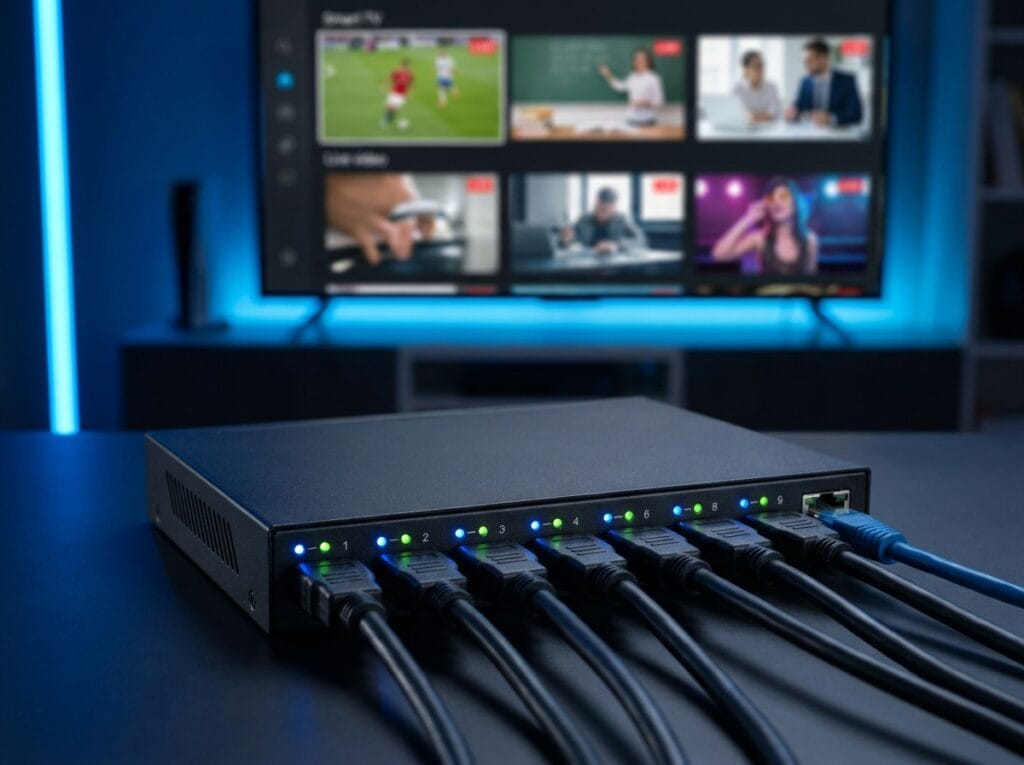
An 8 channel HDMI encoder is a hardware device that takes up to eight HDMI video inputs and converts them into compressed IP video streams. These streams can then be sent across a local network, private IPTV system, streaming server, or online platform.
In a typical IPTV setup, each HDMI source becomes its own stream. For example, channel one may come from a camera, channel two from a satellite receiver, channel three from a laptop, and channel four from a media player. The encoder processes all these signals and generates stream URLs.
When the encoder supports M3U8 HLS, it can create HLS playlist links that are easier to play on many modern devices. Apple describes HLS as a technology for delivering live and on-demand audio and video over standard HTTP, with playback that can adapt to network conditions.
Why M3U8 and HLS Matter
HLS stands for HTTP Live Streaming. M3U8 is the playlist format commonly used by HLS streams. In simple terms, the M3U8 file tells the player where to find the video segments.
The official RFC 8216 specification explains that HLS transfers multimedia streams using playlist files and segment files, with the client reading the playlist to play the stream correctly.
For you, this means an HLS/M3U8 encoder can make your HDMI sources easier to distribute to:
- IPTV players
- Smart TV apps
- Web players
- Mobile devices
- Media servers
- Internal corporate video systems
- Hospitality IPTV systems
How an 8 Channel HDMI IPTV Encoder Works
The process is simple when you break it down.
- You connect HDMI sources to the encoder.
- The encoder captures the video and audio.
- The device compresses each signal using a codec such as H.264 or H.265.
- The encoder creates IP streams.
- You copy the stream URLs, such as M3U8 links.
- Viewers watch the streams through compatible players or IPTV platforms.
Basic IPTV Workflow
| Step | Component | Purpose |
|---|---|---|
| 1 | HDMI source | Camera, receiver, laptop, media player, mixer |
| 2 | 8 channel HDMI encoder | Converts HDMI to IP streams |
| 3 | Network switch/router | Moves streams across your network |
| 4 | IPTV server/player | Organizes and delivers streams |
| 5 | Viewer device | Smart TV, app, phone, tablet, computer |
This workflow is common in professional IPTV systems because it centralizes multiple HDMI sources into one manageable network-based setup.
Why Use an 8 Channel Encoder Instead of Single-Channel Encoders?
You could use eight separate single-channel encoders, but that usually creates more work. More devices mean more power adapters, more cables, more IP addresses, more configuration pages, and more possible points of failure.
An 8 channel HDMI encoder for IPTV M3U8 HLS gives you a cleaner and more professional system.
Main Advantages
- One device handles up to 8 HDMI inputs.
- Setup is cleaner and easier to manage.
- You reduce cable and hardware clutter.
- Each channel can often be configured separately.
- You can manage streams from one web interface.
- It is easier to install in a rack or technical room.
- It is better for hotels, schools, churches, and enterprise systems.
Some professional models, such as the TBS2808X, advertise 8-channel HDMI encoding with H.264/H.265 and protocol support including HTTP, HLS/M3U8, SRT, UDP multicast, and RTMP/RTMPS.
Best Use Cases for an 8 Channel HDMI Encoder
An 8-channel encoder is useful anywhere you need to turn multiple HDMI signals into IPTV or streaming links.
Hotels and Resorts
Hotels often need to distribute internal channels, welcome videos, local TV sources, digital signage, or entertainment feeds to guest rooms. An 8-channel IPTV encoder can feed those sources into a hotel IPTV system.
Schools and Universities
Education environments can use encoders for:
- Lecture capture
- Campus announcements
- Training rooms
- Live classroom distribution
- Internal event broadcasting
Churches and Religious Centers
A church may need multiple camera feeds, lyrics screens, overflow room distribution, and live streaming. An encoder helps convert those HDMI sources into streams for local and remote viewers.
Sports and Event Production
Sports venues can use multiple HDMI inputs for camera angles, scoreboard feeds, replay systems, and commentary sources.
Corporate and Enterprise Video
Companies can use HDMI encoders for internal broadcasts, training, town halls, conference rooms, and executive announcements.
Hospitals and Public Facilities
Hospitals may use IPTV systems for internal TV, information channels, patient education, and staff communication.
Key Features to Look For
Not every encoder that says “8 channel” is right for your project. You need to compare the details carefully.
1. True 8 HDMI Input Support
Make sure the encoder has eight physical HDMI inputs and can stream all eight at the same time. Some devices may have multiple inputs but limited simultaneous encoding capacity.
Check:
- Number of HDMI ports
- Supported input resolution
- Frame rate support
- Whether all channels work simultaneously
- HDMI audio support
- HDCP limitations
For most IPTV applications, 1080p is enough. For higher-end production, you may want 4K input support.
2. HLS and M3U8 Output
Since your target keyword is 8 channel HDMI encoder for IPTV M3U8 HLS, HLS/M3U8 support is essential.
You should confirm:
- Does the device generate
.m3u8links? - Can each channel have its own HLS output?
- Does it support HTTP delivery?
- Can you test the M3U8 link in VLC or an HLS player?
- Does it support main stream and sub-stream output?
HLS is popular because it runs over standard web infrastructure. Apple notes that HLS can use ordinary web servers and content delivery networks, making it practical for many streaming environments.
3. H.264 and H.265 Encoding
Most IPTV encoders support H.264. Many newer models also support H.265, also known as HEVC.
| Codec | Best For | Main Benefit |
|---|---|---|
| H.264 | Maximum compatibility | Works with more devices and players |
| H.265 | Bandwidth saving | Better compression for similar quality |
| MJPEG | Special monitoring cases | Simple but bandwidth-heavy |
H.264 is usually safer when you need broad compatibility. H.265 is useful when you want to reduce bandwidth, especially for higher resolution streams. HEVC/H.265 is known for better compression efficiency than H.264, but older devices may not support it as well.
4. Audio Codec Support
Audio matters as much as video. A stream with clean video but broken audio is still a failed stream.
Look for support for:
- AAC
- MP3
- AC3
- G.711
- Embedded HDMI audio
For HLS playback, AAC is commonly a safe choice.
5. Multiple Streaming Protocols
Even if HLS/M3U8 is your main goal, it is helpful if your encoder supports other protocols.
| Protocol | Best Use |
|---|---|
| HLS/M3U8 | Web, mobile, IPTV apps, smart TVs |
| RTMP | Sending streams to platforms or servers |
| RTSP | Local network monitoring |
| UDP/RTP | IPTV LAN distribution |
| SRT | More reliable remote streaming |
| HTTP | Simple network access |
For example, some 8/16-channel HDMI encoder specifications list support for HTTP, HLS, SRT, RTSP, RTP, UDP, RTMP, and NDI HX outputs.
Important Specifications to Compare
Before you buy, compare the specifications side by side.
| Specification | What to Check | Why It Matters |
|---|---|---|
| HDMI Inputs | 8 physical inputs | Confirms multi-source support |
| Resolution | 1080p or 4K | Affects image quality |
| Codec | H.264/H.265 | Affects compatibility and bandwidth |
| HLS/M3U8 | Yes or no | Needed for playlist-based streaming |
| Network Port | Gigabit Ethernet | Important for 8 streams |
| Audio Codec | AAC, MP3, AC3 | Affects playback compatibility |
| Bitrate Control | Adjustable per channel | Helps manage bandwidth |
| Web GUI | Browser control | Makes setup easier |
| Protocols | HLS, RTMP, RTSP, UDP, SRT | Expands use cases |
| Cooling | Fan or passive | Affects reliability |
A strong encoder should let you control each channel separately. That includes bitrate, resolution, codec, audio settings, stream protocol, and output URL.
Bandwidth Planning for 8 HDMI Channels
Bandwidth is one of the most important parts of IPTV planning. If you run eight channels at the same time, the total bandwidth can grow quickly.
Simple Formula
Total bandwidth = bitrate per channel × number of channelsBandwidth Example Table
| Bitrate Per Channel | Number of Channels | Estimated Total Bandwidth |
|---|---|---|
| 3 Mbps | 8 | 24 Mbps |
| 5 Mbps | 8 | 40 Mbps |
| 8 Mbps | 8 | 64 Mbps |
| 10 Mbps | 8 | 80 Mbps |
| 15 Mbps | 8 | 120 Mbps |
You should always add extra headroom. If your total stream bitrate is 80 Mbps, do not design the network as if 80 Mbps is enough. Give yourself extra capacity for stability, overhead, monitoring, and future expansion.
Practical Bandwidth Tips
- Use Gigabit Ethernet.
- Avoid Wi-Fi for encoder output.
- Use quality network switches.
- Separate IPTV traffic from office traffic when possible.
- Use multicast for LAN IPTV when supported.
- Lower bitrate for less important channels.
- Use H.265 only when your players support it.
HLS/M3U8 vs RTMP vs RTSP vs UDP
Each streaming protocol has a different purpose. Choosing the right one depends on your viewing environment.
| Protocol | Best Use Case | Strength | Limitation |
|---|---|---|---|
| HLS/M3U8 | Web and mobile playback | High compatibility | Higher latency |
| RTMP | Platform ingest | Common for sending to servers | Less ideal for direct browser playback |
| RTSP | Local monitoring | Good for LAN viewing | Not browser-friendly |
| UDP Multicast | IPTV over LAN | Efficient for many TVs | Needs network configuration |
| SRT | Remote streaming | Handles unstable networks better | Requires compatible receiver |
For most modern IPTV and web viewing systems, HLS/M3U8 is a practical choice. For internal IPTV over a local network, UDP multicast may be useful. For sending streams to a platform, RTMP or SRT may be better.

How to Set Up an 8 Channel HDMI Encoder
The exact interface depends on your encoder model, but the general setup is usually similar.
Step-by-Step Setup
- Connect each HDMI source to the encoder.
- Connect the encoder to your network switch or router.
- Power on the device.
- Find the encoder IP address.
- Open the web management page in your browser.
- Log in to the admin panel.
- Configure each channel.
- Choose H.264 or H.265.
- Set resolution, frame rate, and bitrate.
- Select audio codec.
- Enable HLS/M3U8 output.
- Copy each M3U8 stream URL.
- Test streams in VLC or an IPTV player.
- Add the stream links to your IPTV platform.
Example M3U8 Links
http://encoder-ip/live/channel1.m3u8
http://encoder-ip/live/channel2.m3u8
http://encoder-ip/live/channel3.m3u8
These are only examples. Your real link format depends on your device.
Common Problems and Troubleshooting
Even a good encoder needs correct configuration. Here are common problems and how to approach them.
Problem: No M3U8 Link Appears
Possible causes:
- HLS output is disabled.
- Firmware does not support HLS.
- Wrong channel settings.
- HTTP service is turned off.
- The feature requires a license or update.
What to do:
- Check the HLS/M3U8 settings.
- Restart the encoder.
- Update firmware.
- Read the manual.
- Contact the manufacturer.
Problem: Video Buffers or Freezes
Possible causes:
- Bitrate is too high.
- Network is overloaded.
- Switch is not strong enough.
- Viewer internet is weak.
- Too many people are watching at once.
What to do:
- Lower the bitrate.
- Use wired Ethernet.
- Upgrade the switch.
- Test one channel at a time.
- Monitor network usage.
Problem: Audio Is Out of Sync
Possible causes:
- HDMI source delay.
- Encoder processing delay.
- Wrong audio settings.
- Player compatibility issue.
What to do:
- Try AAC audio.
- Restart the HDMI source.
- Test another player.
- Adjust sync settings if available.
Problem: Stream Works in VLC but Not on Website
Possible causes:
- Browser does not play that stream directly.
- You need an HLS player library.
- CORS settings are blocking playback.
- HTTP/HTTPS conflict exists.
- Segment paths are incorrect.
What to do:
- Test with an HLS web player.
- Check CORS headers.
- Use HTTPS correctly.
- Confirm playlist and segment URLs.
Buying Checklist for an 8 Channel HDMI Encoder for IPTV M3U8 HLS
Before buying, use this checklist:
- Does it have 8 real HDMI inputs?
- Can all 8 channels stream at the same time?
- Does it support HLS/M3U8 output?
- Does it support H.264 and H.265?
- Does it have Gigabit Ethernet?
- Can you control bitrate per channel?
- Does it support your target resolution?
- Does it support AAC audio?
- Does it include a web management interface?
- Does it support RTMP, RTSP, UDP, or SRT if needed?
- Does it work with your IPTV player or middleware?
- Is technical documentation available?
- Does the seller provide support?
- Are firmware updates available?
Do not buy only based on the lowest price. In IPTV, stability is often more valuable than saving a small amount upfront.
Entry-Level vs Professional vs Enterprise Encoder
| Feature | Entry-Level Encoder | Professional Encoder | Enterprise Encoder |
|---|---|---|---|
| HDMI Channels | 8 | 8 | 8 or more |
| Resolution | Usually 1080p | 1080p/4K | Advanced 4K workflows |
| Codec | H.264 | H.264/H.265 | H.264/H.265 advanced profiles |
| HLS/M3U8 | Sometimes | Usually | Yes |
| SRT Support | Rare | Sometimes | Often |
| Web GUI | Basic | Better | Advanced |
| Stability | Basic | Strong | High-end |
| Best For | Small systems | Hotels, schools, churches | Broadcast and enterprise |
If your project is small and local, an entry-level model may be enough. If your system must run every day for many viewers, choose a professional or enterprise-grade encoder.
FAQ About 8 Channel HDMI Encoder for IPTV M3U8 HLS
What is an 8 channel HDMI encoder for IPTV M3U8 HLS?
An 8 channel HDMI encoder for IPTV M3U8 HLS is a device that converts eight HDMI video sources into IP streams. When it supports HLS/M3U8, it can generate stream playlist links for IPTV players, smart TVs, web players, and mobile devices.
Can one encoder stream all 8 HDMI channels at the same time?
Yes, a true 8-channel HDMI encoder should stream all eight inputs at the same time. You still need to check the maximum resolution, bitrate, codec, and network capacity.
Is H.264 or H.265 better for IPTV?
H.264 is better for compatibility. H.265 is better for bandwidth efficiency. For older devices, H.264 is usually safer. For modern devices and bandwidth-limited networks, H.265 may be better.
Why is M3U8 important for IPTV?
M3U8 is the playlist format commonly used with HLS. It helps players find and play video segments correctly, making it useful for internet-based IPTV streaming.
Can I use an 8 channel HDMI encoder for hotel IPTV?
Yes. Hotels commonly use HDMI encoders to distribute internal channels, welcome screens, local TV sources, and entertainment feeds through IPTV systems.
What network speed do I need?
It depends on bitrate. If each of your 8 channels uses 5 Mbps, your encoder output needs about 40 Mbps, plus extra overhead. A Gigabit network is strongly recommended.
Can I test M3U8 streams in VLC?
Yes, many M3U8 streams can be tested in VLC. Open VLC, choose “Open Network Stream,” and paste the M3U8 URL.
Conclusion: Choose the Right Encoder for a Stable IPTV System
An 8 channel HDMI encoder for IPTV M3U8 HLS is one of the most important devices in a professional multi-source streaming setup. It allows you to convert HDMI signals into network streams that can be used for IPTV, web viewing, internal broadcasting, hotel TV, education, worship, sports, and enterprise video.
The right encoder should give you stable performance, clean M3U8 links, HLS support, flexible bitrate control, strong codec options, and easy management. Before you buy, compare the specifications carefully. Look at HDMI input support, H.264/H.265 encoding, HLS output, network capacity, audio compatibility, protocol support, and technical support.
Your IPTV system is only as strong as the equipment behind it. Choose a reliable encoder, plan your bandwidth properly, test your streams, and build a setup that gives your viewers smooth, clear, and dependable video.
Ready to build a stronger IPTV system? Start by listing your HDMI sources, target devices, resolution needs, and bandwidth limits. Then compare encoders using the checklist above and choose the model that matches your real-world streaming environment.